ant a cartoon character to wave, a product image to move, or a reaction graphic that loops without making a full video? ChatGPT’s Images 2.6 update adds GIF creation to its image tools. You can describe a short action in everyday language and ask for a looping animated file. But a good prompt still matters: the object should remain recognizable, the background should stay steady, and the last frame should transition naturally into the first.
Quick answer: Open ChatGPT, ask for an animated, looping GIF, describe the subject and exact motion, and specify which features should not change. Once it is generated, open the result to save or share it. ChatGPT’s GIF feature is rolling out, so it may not appear on every account at the same time. OpenAI’s Images help page explains the current workflow.
Our testing note: For this tutorial, we inspected a real blue-robot waving GIF supplied after trying our prompt. We verified its file format, frame count, dimensions, frame timing, loop setting and visible motion. We did not independently record the user’s ChatGPT screen or measure generation time, so we do not claim a confirmed model-selection path or a timed speed benchmark.
What Changed With ChatGPT Images 2.6?
On November 4, 2026, OpenAI announced Images 2.6 for ChatGPT, Codex and the API. The release includes GIF generation and improvements to image-generation speed and consistency across editing rounds. For ordinary users, the practical difference is simple: a short animated graphic no longer has to begin with a traditional animation timeline. You can start with a text prompt—or, where available, ask ChatGPT to animate an uploaded still image. Official announcement.
That does not turn every GIF into a full cinematic video. A GIF is generally better for a brief repeating gesture, expression, or simple movement than for lengthy scenes with dialogue or complicated camera changes.
How to Make an Animated GIF in ChatGPT
Step 1: Open ChatGPT and describe the animation
Open ChatGPT on web or the mobile app. You can ask for a GIF in your conversation, without first creating a separate animation project. Make it clear that you want an animated GIF and not a single still image.
Step 2: Describe one clear movement
Keep the first test small: a character waving, a star twinkling, steam rising from a cup, or a product gently rotating. A single action is easier to judge than five moving objects at once.
Step 3: State what must stay consistent
Specify the face, clothing, colors, background and camera position. Ask for no text or logos unless you need them. This helps you spot whether the motion is changing the character’s identity or simply moving part of the scene.
Step 4: Ask for a clean loop
Use language such as “short seamless loop” and “return smoothly to the starting pose.” If the animation jumps noticeably at the end, simplify the motion or make the final pose closer to the first frame.
Step 5: Review the result and save the GIF

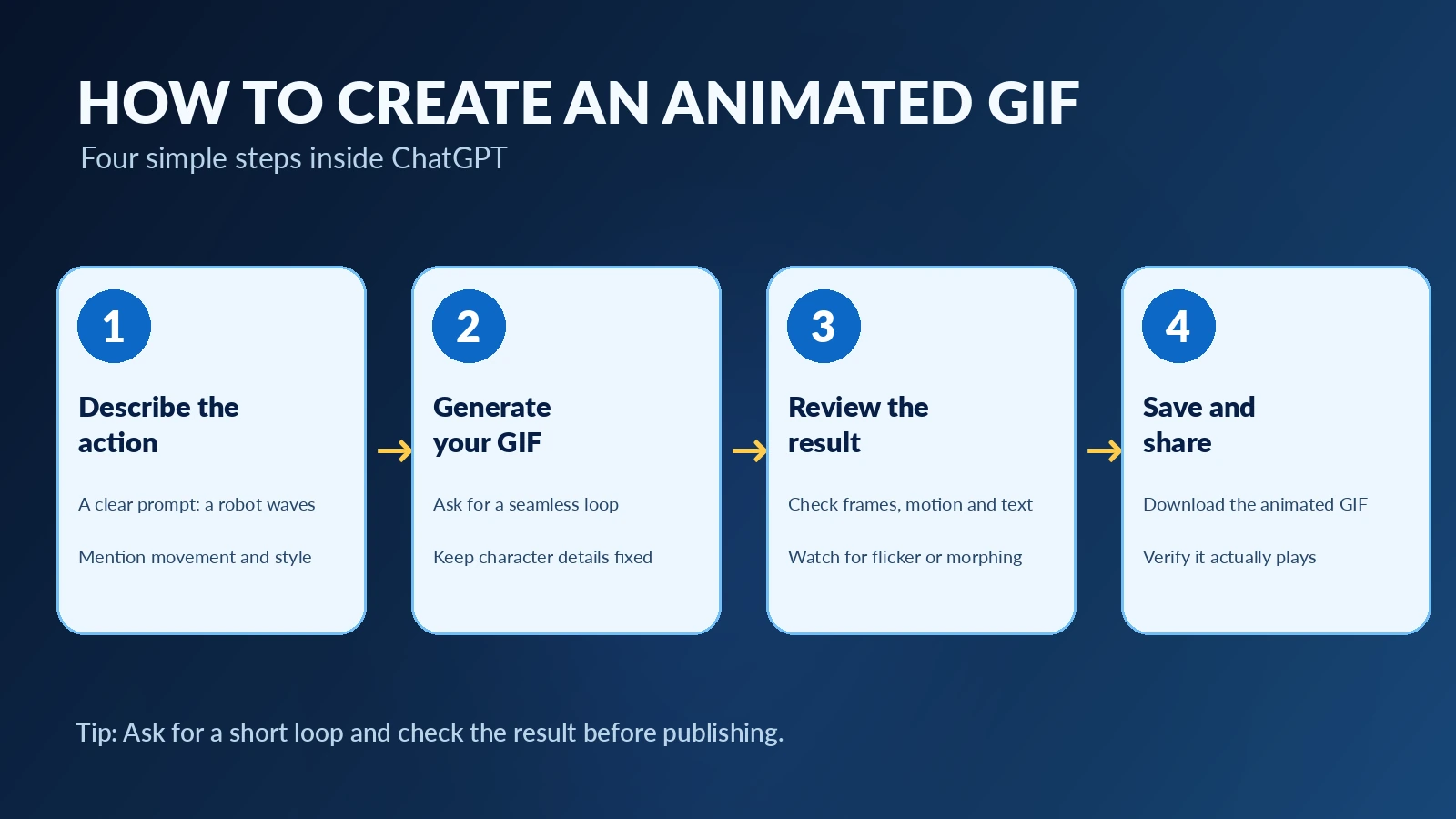
Check that the image actually moves, that the motion repeats, and that the subject stays recognizable. Open the finished GIF to use the available save or share controls. OpenAI’s help article also describes playback-speed adjustments for GIFs created in ChatGPT. The exact interface may differ as the feature rolls out.
Our Hands-On Example: A Friendly Blue Robot Waving
We used this prompt for a simple mascot-style test:
Create a short, seamless looping animated GIF of a friendly blue robot mascot waving its hand. Keep the same face, body proportions, colors and background throughout. Smooth motion, clean modern illustration, no text or logos.
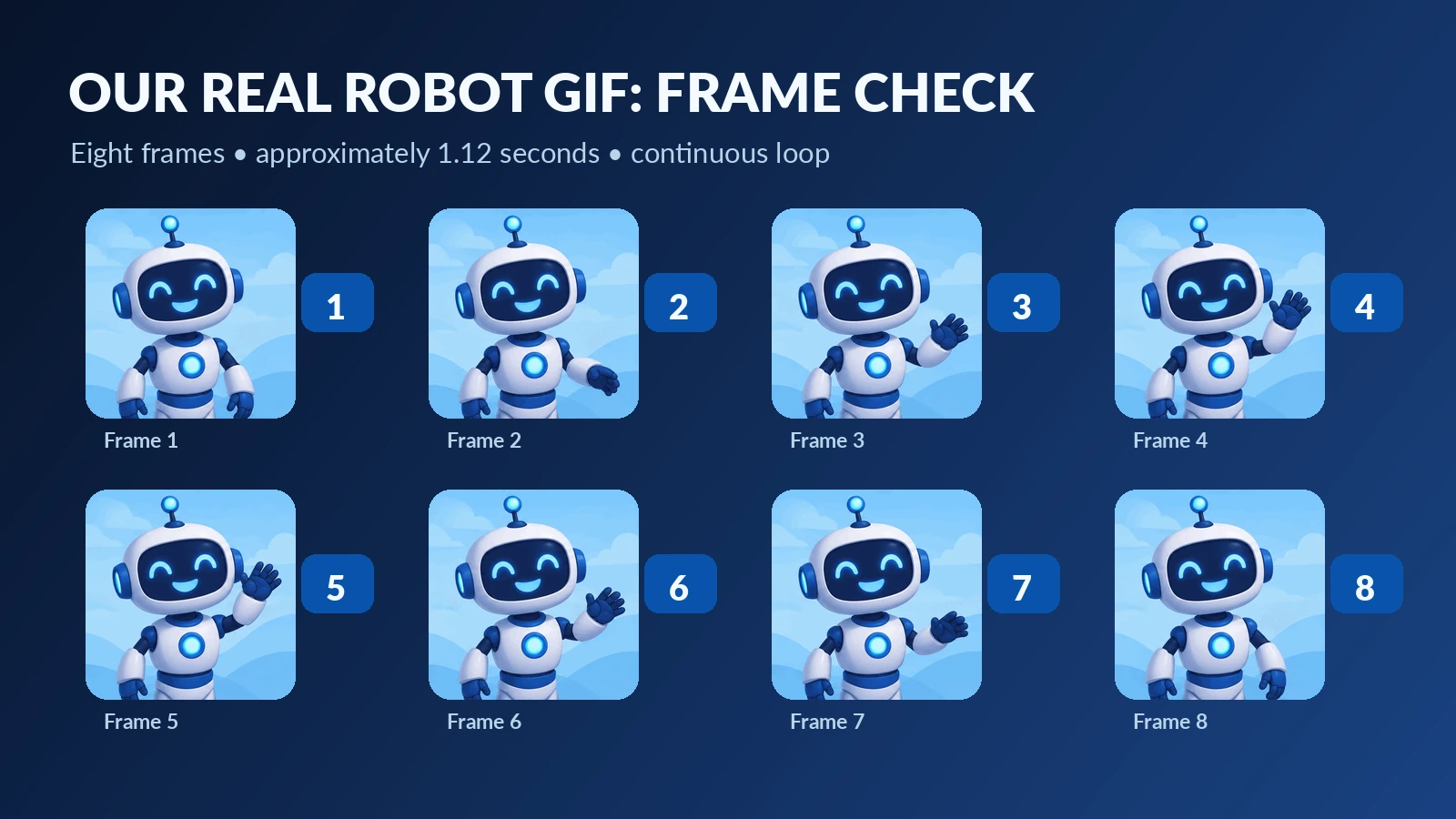
Actual GIF output: The robot’s arm rises, its open hand waves and then lowers. The face remains smiling, with matching blue-and-white styling and a stable background throughout the eight frames. The animation looks clear and friendly, although the short frame sequence gives it relatively simple movement rather than film-like fluidity.
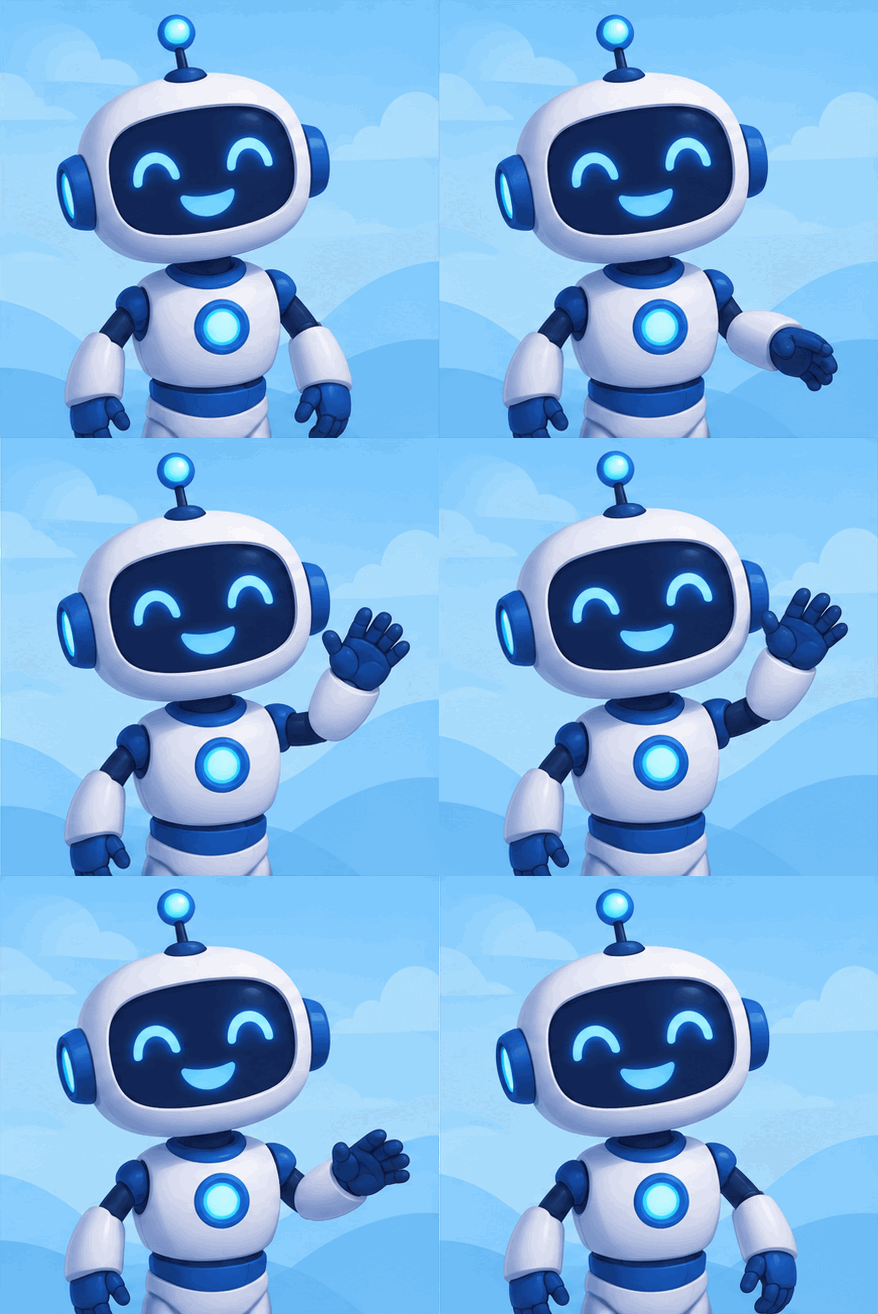
Caption: The real eight-frame robot animation used for our hands-on review. This is an actual animated GIF, not a mock screenshot or a static AI image.
What We Verified in the File
| Check | Verified result |
|---|---|
| Format | Animated GIF |
| Canvas | 439 × 438 pixels |
| Frames | 8 |
| Timing | 140 milliseconds per frame |
| Full loop | 1.12 seconds |
| Loop metadata | Infinite repeat |
| File size | Approximately 426 KB |
| Visible action | Raise hand → wave → lower hand |
| Consistency | Face and colors remain recognizably stable |
This is a single example, not a test of how reliably every prompt works. We also did not compare multiple generations to calculate a success rate.
Four Copy-and-Paste GIF Prompts for Beginners
1. Friendly mascot waving
Create a short, endlessly looping animated GIF of a friendly robot waving one hand. Static camera, same face and outfit, simple pale-blue background. The hand moves up, pauses briefly, and returns to the original pose. Smooth incremental motion, no text, no logos.
Use it for: A website welcome message or brand mascot. Inspect: Does the face stay the same between frames?
2. Coffee cup with rising steam
Generate a seamless looping GIF of a ceramic cappuccino cup on a wooden table. Thin steam rises gently from the coffee and fades away. Keep the cup, table, lighting, and camera completely still. Soft morning light, realistic style, no words or branding.
Use it for: A café mood graphic. Inspect: Does the steam reset naturally, without the cup changing shape?
3. Product highlight
Make a short looping GIF of one generic navy reusable bottle on a clean studio pedestal. A narrow highlight slowly moves across the bottle and returns to its starting position. Keep the bottle silhouette, label-free surface, background, and camera fixed. No new objects, no text.
Use it for: A concept mockup. Inspect: Does the product remain structurally consistent? Never substitute generated product images for photographs of a real item when accuracy matters.
4. Simple reaction animation
Create a tiny looping reaction GIF of a cheerful round character giving a thumbs-up. The character blinks once and gently raises its thumb, then returns to the starting pose. Clean flat illustration, stable background, consistent proportions, no text.
Use it for: A friendly comment or community reaction. Inspect: Are the gesture and facial expression easy to understand at small size?
These are suggested prompts, not four independently tested outcomes. Our verified result in this guide is the blue-robot GIF above.
Can You Turn a Still Image Into a GIF?
OpenAI says you can upload an existing still image and request that ChatGPT animate it. For example, upload a mascot illustration and ask for a small hand wave while keeping the character design unchanged. Use an image you own or have permission to edit.
There is an important distinction: OpenAI’s current Help Center says ChatGPT cannot edit an animated GIF that you upload. That is different from making changes to a GIF it just created in your conversation. If you want to revise an animation, work from the generated GIF in its original chat when possible, or start again from a still reference image. Source: OpenAI Help Center.
Is ChatGPT GIF Creation Free?
OpenAI says ChatGPT Images is available across subscription tiers, but its help article states that GIF generation is rolling out. Availability and usage limits can vary by account and time. A free ChatGPT account may have more limited image-generation usage than a paid account, and a feature appearing in an announcement does not guarantee that every person sees the control immediately.
The safest test is to sign in, ask for a simple looping GIF and see whether the tool is available on your account. Avoid paying for a plan solely because another user has posted a screenshot of a feature you cannot yet access. Official availability guidance.
Why a GIF Sometimes Looks Wrong
| Problem | What to try |
|---|---|
| Output is a still image | Explicitly request an animated looping GIF and describe moving parts |
| The character’s face changes | Keep one subject and repeat the identity details that must remain fixed |
| The loop visibly jumps | Ask for a final frame that returns to the starting pose |
| Motion looks choppy | Simplify the action; request smaller movement between frames |
| Background or product shape shifts | Specify a fixed camera, fixed background and no extra objects |
| Feature unavailable | Check again later; GIF creation is still rolling out |
Our mascot example shows why clear motion and preserving character identity are two separate checks. The arm movement worked, while the eight-frame timing left the wave a little stylized.
When Is a GIF Better Than an AI Video?
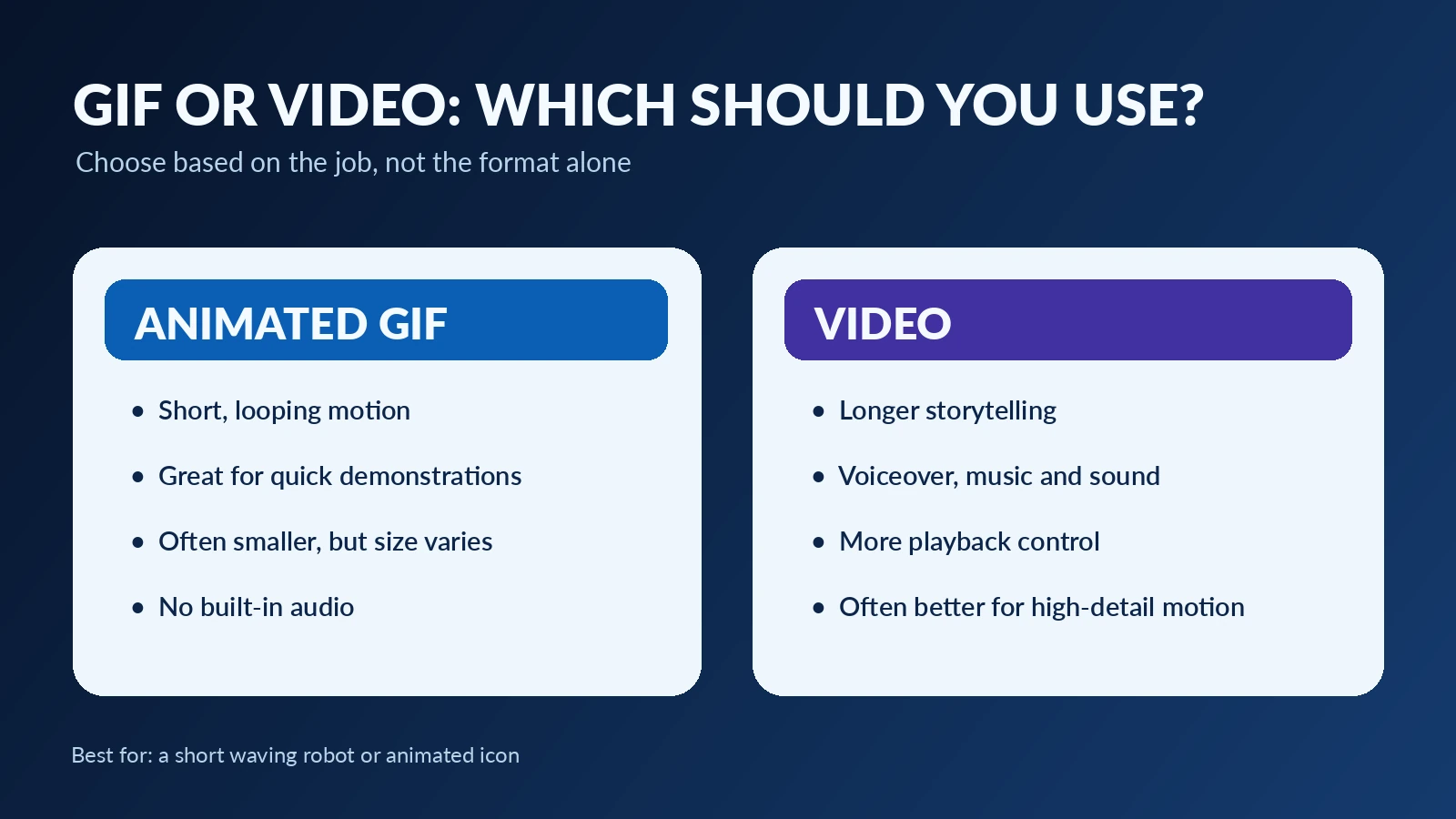
Choose a GIF for a short, silent, repeatable action: a mascot greeting, tiny reaction, simple demonstration or visual accent. Choose video for longer actions, spoken narration, complex camera movement, scenes with sound, or content requiring precise timing. GIFs typically have no audio, and large animated files can slow a webpage if you use too many.
For Daily Tool Guide, we would embed one working GIF as the demonstration, keep the rest of the page mostly still, and provide a descriptive caption. The featured blog image should be a separate, high-quality landscape visual rather than a stretched 439-pixel GIF.
If you are comparing image-generation tools, our AI image generators guide covers a different task: producing a still image. Our Canva Craft guide explains image composition and editing rather than GIF animation.
Frequently Asked Questions
Does ChatGPT Images 2.6 make animated GIFs?
Yes. OpenAI announced GIF generation as part of Images 2.6 on November 4, 2026. The ChatGPT GIF feature is rolling out.
Can I use my own character picture?
OpenAI says you can upload a still picture and ask ChatGPT to animate it. Check that you have permission to use the image.
Can ChatGPT edit an animated GIF I upload?
Not currently, according to OpenAI’s published Help Center. It can offer editing options for GIFs created within ChatGPT, but uploading an already-animated GIF for editing is a different case.
How long should my first GIF be?
There is no universal required duration. Start with one short, repeatable motion. Our sample has an approximately 1.12-second loop, which is enough for a small wave.
Will an animated GIF improve my Google rankings?
There is no guaranteed ranking benefit from adding a GIF. Use it when it helps readers understand the feature. Google’s guidance emphasizes useful, original, people-first content—not adding visual files simply to influence indexing.
Final Verdict
ChatGPT’s GIF feature makes it easier to experiment with short animations from a simple text prompt. In our hands-on file review, a blue robot performed a recognizable wave in an eight-frame looping GIF, with a consistent face and background. It is a promising beginner example, not proof that every animation will be perfectly smooth.
Start with one subject, one movement and one clear loop. Then check the actual file instead of judging only the preview. That one extra review step is what turns a fun AI result into a trustworthy tutorial example.
Sources and Testing Method
- OpenAI — Introducing Images 2.6 (November 4, 2026)
- OpenAI Help Center — Images in ChatGPT
- Google Search Central — Creating helpful, reliable, people-first content
Testing method: We inspected the uploaded GIF file and its eight individual frames, measured dimensions and animation timing, and reviewed visible motion and character consistency. The source UI and image-generation timing were not independently recorded. Other prompts in this article are demonstrations to try, not claims of separ