AI-generated images, videos and audio are becoming increasingly realistic. In many cases, simply looking at a piece of media is no longer enough to confidently tell whether it was created by a person, edited with AI, or generated entirely by an AI model.
Google is trying to make that easier with SynthID Detector.
On October 7, 2026, Google expanded SynthID Detector globally in English, allowing anyone to check supported images, videos and audio for invisible SynthID watermarks. Google says the detector can identify supported AI-generated media from Google and participating partners including OpenAI, NVIDIA and Kakao, with Apple support planned as well.
SynthID Detector is not a universal “AI detector” that can prove whether every image, video, audio file or piece of text was made by AI.
Instead, it looks for supported provenance signals—especially SynthID watermarks embedded when compatible AI tools create or modify media. This guide explains what the detector is, how it works, what it can currently check, and what a negative result really means.
If you are completely new to AI, start with our What Is Artificial Intelligence? A Simple Guide for Beginners.
Quick Answer: What Is Google SynthID Detector?
Google SynthID Detector is a verification tool that checks supported digital media for SynthID, an invisible watermark used to identify content created or modified with compatible AI systems.
Google introduced SynthID in 2023 and has expanded the technology across images, video, audio and some AI-generated text. The public detector expansion announced in October 2026 focuses on checking images, videos and audio.
Google says SynthID has now been used to watermark more than 180 billion images and videos, along with the equivalent of 240,000 years of audio.
What Is SynthID?
SynthID is Google DeepMind’s digital watermarking technology for AI-generated content. Unlike a visible logo in the corner of an image, SynthID is designed to be imperceptible to people.
The watermark is embedded directly into compatible content when an AI model generates or modifies it. Later, a supported verification system can scan the file and look for that signal.
A detected watermark can provide evidence about how media was created or edited. It does not prove that the information shown in the media is true.
That distinction matters because provenance and factual accuracy are different questions.
How Does SynthID Work?
Images and Video
For compatible AI-generated images and video, SynthID embeds an invisible digital watermark into the visual content. Google says the watermark is designed to remain detectable after common modifications such as cropping, filters, frame-rate changes and lossy compression.
Audio
For supported AI-generated audio, SynthID embeds an inaudible signal. Google says the watermark is designed to survive common changes such as MP3 compression, added noise and speed adjustments.
Text
SynthID technology can also watermark certain AI-generated text. Google explains that it does this by subtly changing token probabilities while text is generated so a statistical watermark remains in the output.
However, the October 2026 public SynthID Detector announcement is specifically about verification of images, video and audio. It should not be described as a universal AI-writing detector.
What Can Google SynthID Detector Detect?
| Content type | What to expect |
|---|---|
| Supported Google AI images | Detectable when SynthID was embedded |
| Supported Google AI video | Detectable when SynthID was embedded |
| Supported Google AI audio | Detectable when SynthID was embedded |
| Supported partner AI media | Increasingly supported in the standalone detector |
| Any random AI-generated image | Not guaranteed |
| Every OpenAI or ChatGPT output | No |
| Any AI-written blog article | No — not a universal text detector |
Google says the expanded standalone detector can check compatible media from Google and participating partners including OpenAI, NVIDIA and Kakao, with Apple expected to join. That does not mean every file from every product by those companies automatically carries SynthID.
How to Use Google SynthID Detector

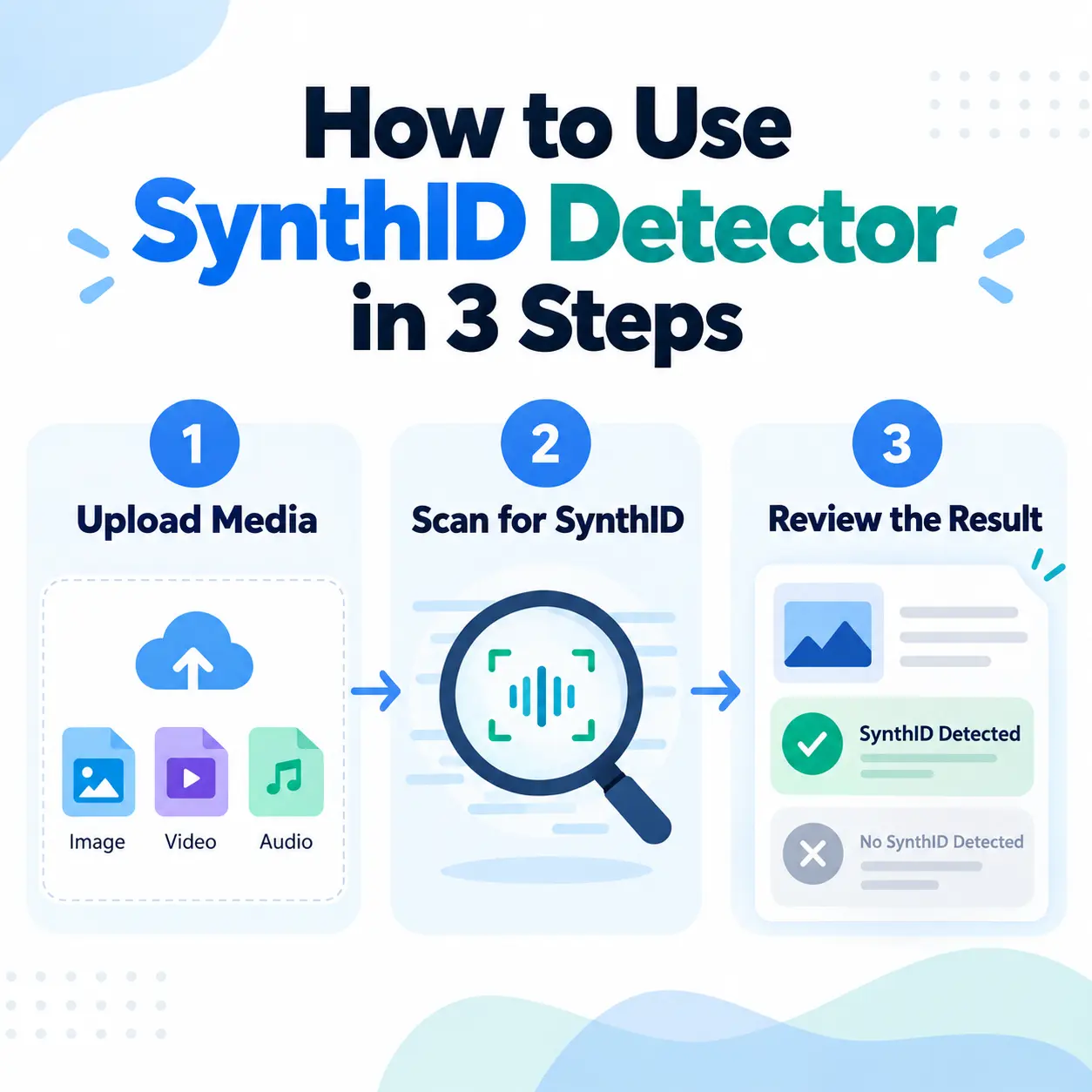
The standalone detector is available globally in English. The exact interface may change over time, but the basic workflow is simple:
- Open Google DeepMind’s SynthID page and choose the option to try the detector.
- Upload the image, video or audio file you want to examine.
- Review the detector result and any information it provides about where the watermark was found.
Open the official Google DeepMind SynthID page
You Can Also Check Google AI Media in Gemini
Google also provides verification inside Gemini for signed-in users. You can upload one image, video or audio file and ask whether it was created or edited using Google AI.
Gemini uses two technologies for this: SynthID and Content Credentials. At the moment, Gemini’s SynthID verification can recognize content created by Google AI tools; Google’s separate public SynthID Detector has broader partner support.
- One file can be checked at a time.
- The file can be up to 100 MB.
- Videos should be under 90 seconds.
- Audio should be under one hour.
- Usage quotas apply.
What Does “SynthID Detected” Mean?
If SynthID is detected, the verification system found a compatible invisible watermark associated with supported AI generation or editing.
That is useful provenance evidence, but it does not answer whether the content is truthful, misleading, parody, edited out of context, or factually accurate.
What Does “No SynthID Detected” Mean?
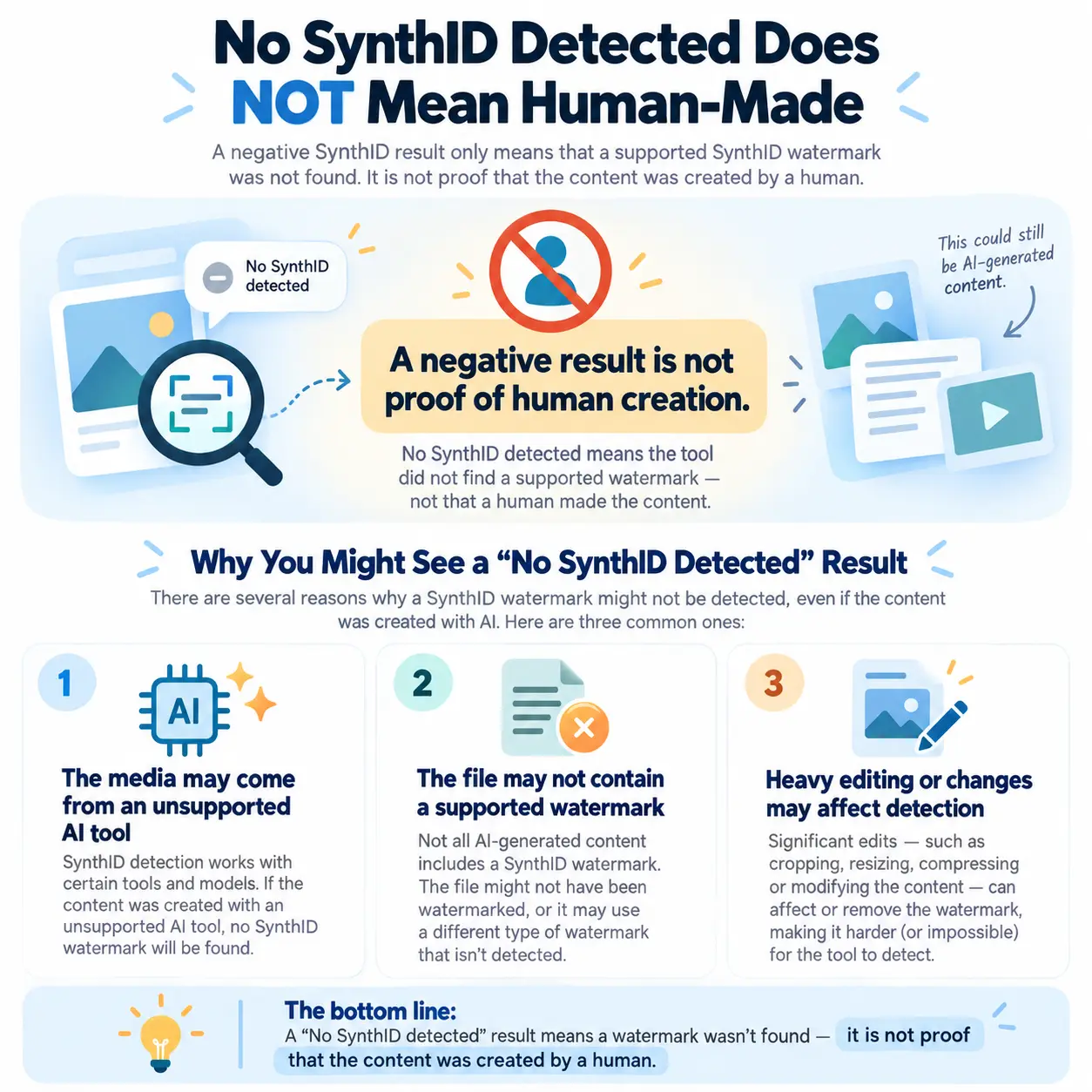
This is the most important limitation for beginners to understand.
No SynthID detected does not mean “definitely human-made.”
A negative result can happen for several reasons:
- The media was generated by an unsupported AI system.
- The tool did not use SynthID when that file was created.
- The content uses a different provenance technology.
- The media was altered enough that the watermark is difficult to detect.
- The file never contained a watermark in the first place.
Google’s Gemini help documentation makes the same basic point: if a SynthID watermark is not detected, the media may still have been created by another AI system.
Can SynthID Detect OpenAI or ChatGPT Content?
Google says the expanded standalone SynthID Detector supports compatible media from partners including OpenAI. But this does not mean it can identify every output created by ChatGPT or other OpenAI products.
The key question is whether that specific file was created or edited using a workflow that embedded SynthID. You should not expect the detector to take a random article and reliably tell you whether ChatGPT wrote it.
Is Google SynthID Detector an AI Writing Detector?
No—not in the way many third-party “AI detector” websites use that phrase.
| Traditional AI-text detector | SynthID |
|---|---|
| Estimates whether text looks AI-generated | Looks for a watermark intentionally embedded by a compatible system |
| Can produce probability-style guesses | Provides provenance evidence when a supported signal is present |
| Does not require the generator to add a watermark | Depends on watermark adoption and support |
A more accurate description is: Google’s AI-content watermark verification technology.
Does Google Use SynthID to Detect AI-Written Websites for SEO?
Google has not presented SynthID Detector as a Search-ranking test for deciding whether a website deserves to rank.
Google Search guidance instead focuses on whether content is helpful, accurate, original, relevant and created primarily for people. Google also warns that using generative AI to create many low-value pages without adding value may violate its scaled-content-abuse policies.
If you publish AI-assisted information, our How to Fact-Check AI Answers guide explains a practical verification process before publishing important claims.
Is SynthID Related to Google AdSense Approval?
SynthID Detector should not be treated as an AdSense approval test. It is a media-verification and provenance technology.
For a publisher, stronger priorities include useful original content, clear navigation, trustworthy authorship, accurate information, policy compliance and a good user experience.
In other words, do not chase a particular “AI detector score.” Focus on whether the article genuinely helps the reader and whether important claims can be verified.
SynthID vs Content Credentials: What’s the Difference?
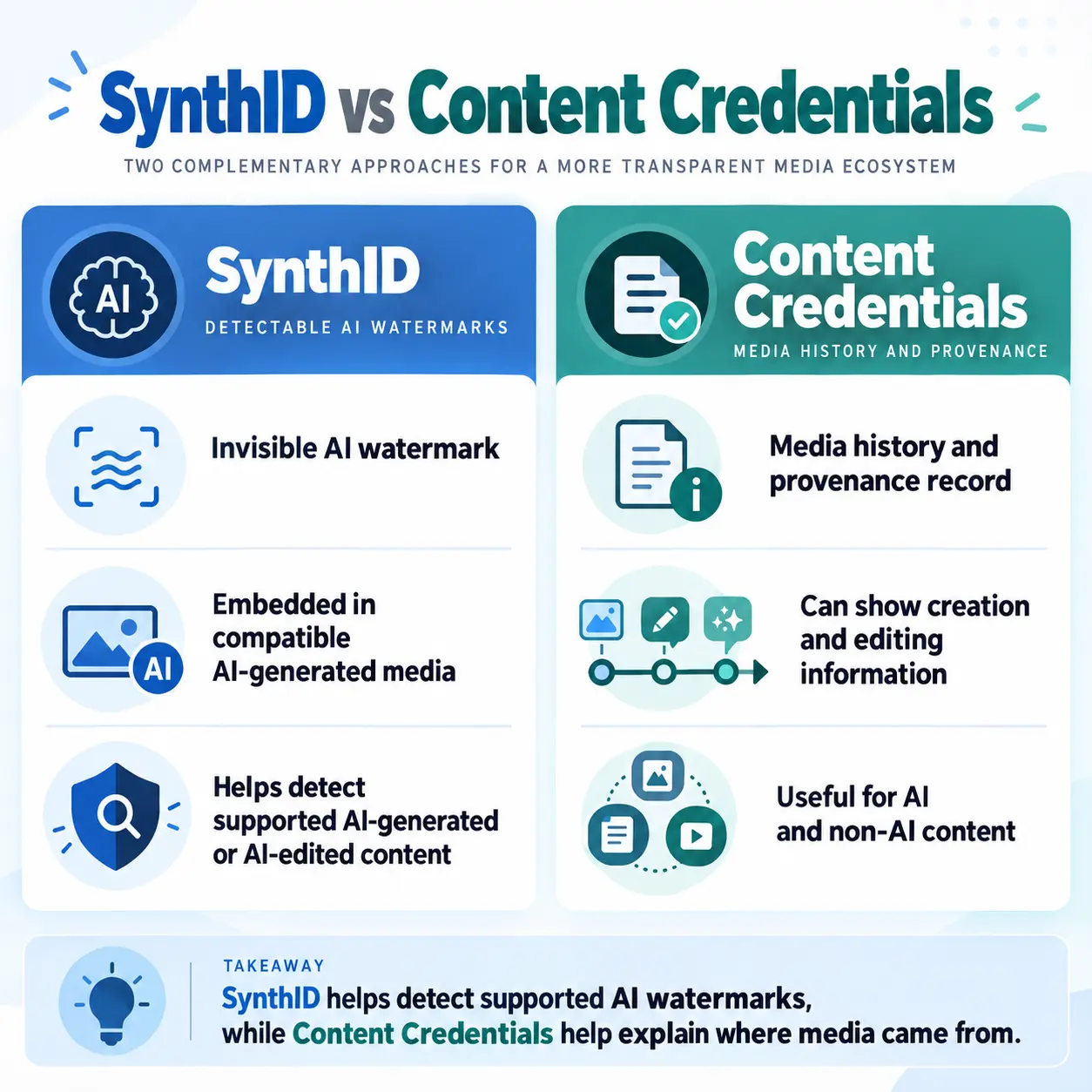
Google increasingly uses two complementary approaches to media verification.
SynthID
An invisible watermark embedded directly into compatible AI-generated or AI-edited media.
Content Credentials
A provenance standard based on C2PA that acts more like a signed digital history for a file. It can provide information about where media came from, which compatible tools edited it, and whether AI was involved.
Simple version: SynthID = invisible watermark. Content Credentials = signed media history.
They can complement each other rather than replacing one another.
Can You Remove a SynthID Watermark by Editing the File?
SynthID is designed to survive common transformations. For images and video, Google says it is intended to remain detectable after operations such as cropping, filters, compression and frame-rate changes. For audio, it is designed to tolerate changes such as compression, added noise and speed adjustments.
However, Google also notes that after enough alterations there is still a possibility that a watermark will no longer be detected.
SynthID is designed to be robust, not indestructible.
SynthID Detector Has Important Limitations
It Cannot Detect Every AI Tool
If an AI generator does not use SynthID or another supported provenance signal, the detector may have nothing to find.
A Negative Result Does Not Prove Human Creation
No detected watermark is not the same as proof that a person created the media.
It Does Not Tell You Whether the Content Is True
An AI-generated image can be fictional, but a human-made photo can also be misleading when paired with the wrong caption. Verification of origin does not replace verification of facts and context.
Our AI Hallucinations Explained guide covers another reason AI-generated information still needs checking.
Editing Can Affect Detection
SynthID is designed to survive common edits, but heavy modification can interfere with detection.
Other Ways to Check Suspicious AI Media
Do not rely on a single detector when something important is at stake. Useful additional checks include:
- Reverse image search to find earlier versions or the original source.
- Checking who first published the media and whether the original account is trustworthy.
- Reviewing metadata or Content Credentials when available.
- Looking for inconsistencies such as garbled text, strange small details, inconsistent lighting or unnatural repeated patterns.
Visual clues are becoming less reliable as generation quality improves, so they should be treated as clues rather than proof.
Who Is SynthID Detector Useful For?
Everyday Social Media Users
It can provide extra context when a suspicious image, video or audio clip is spreading online.
Journalists and Researchers
Google originally tested the detector with media professionals before expanding public access.
Teachers and Students
It can help demonstrate how provenance systems work and why AI-generated media should still be verified.
Businesses and Content Teams
Organizations can use provenance checks as one part of a wider verification process before reusing media received online.
Why Is Google Expanding SynthID Now?
Generative media is easier to create and increasingly realistic. Google says clearer information about the origin of online media can help people make more informed decisions about what they see and share.
According to Google, SynthID has now been used to watermark more than 180 billion images and videos and the equivalent of 240,000 years of audio. Google also says built-in verification features across Search, Gemini and Chrome now handle more than one million requests per day.
Final Thoughts
Google SynthID Detector is a useful step toward making AI-generated media easier to identify. Its biggest strength is that it looks for supported provenance signals rather than simply guessing whether something looks AI-generated.
But that also explains its biggest limitation: if the content does not carry a supported watermark, the detector may not be able to identify it.
SynthID detected = useful evidence of supported AI generation or editing. No SynthID detected does not prove that the content is human-made.
Use SynthID alongside source verification, reverse-image searching, Content Credentials and critical thinking rather than treating it as a universal truth detector.
Frequently Asked Questions
What is Google SynthID Detector?
SynthID Detector is Google’s verification tool for identifying supported AI-generated or AI-edited media by looking for invisible SynthID watermarks.
Is Google SynthID Detector free?
Google expanded access globally in English on October 7, 2026 and describes the detector as available to everyone.
Can SynthID detect AI-generated images, videos and audio?
Yes, when the compatible content carries a supported SynthID watermark.
Can SynthID detect ChatGPT content?
The standalone detector supports compatible media from partners including OpenAI, but it cannot identify every ChatGPT or OpenAI output. Support depends on whether SynthID was embedded in that particular content.
Can SynthID tell whether an article was written by AI?
Do not treat the public SynthID Detector as a universal AI-writing detector. The October 2026 public launch focuses on image, video and audio verification, although SynthID technology also supports certain text-watermarking use cases.
Does no watermark mean the content is real?
No. It only means the supported watermark was not found. The media may still have been generated by another AI system or created without a detectable provenance signal.
Does Google use SynthID to punish AI-written websites?
Google has not presented SynthID Detector as a Search-ranking test for websites. Google Search guidance instead emphasizes helpfulness, originality, accuracy, relevance and people-first content.
Sources & Further Reading
Google — Making it easier to identify AI-generated content globally (Oct. 7, 2026)
Google DeepMind — SynthID overview and how it works
Google Gemini Help — Verify AI-generated images, videos and audio
Google Search Central — Guidance on generative AI content for websites